
Master secure JWT authentication for .NET Core APIs and React frontends. Learn battle-tested implementation strategies, avoid critical security flaws, and implement best practices for enterprise-grade auth.

Master secure JWT authentication for .NET Core APIs and React frontends. Learn battle-tested implementation strategies, avoid critical security flaws, and implement best practices for enterprise-grade auth.
JWTs (JSON Web Tokens) have become the backbone of modern web authentication, powering 78% of new .NET Core and React stacks according to 2025 industry data. But here’s the uncomfortable truth we’ve learned from auditing many client projects:
JWT implementations fail in two ways:
After migrating legacy auth systems like WS-Security to JWT for many clients through our .NET Core and React Development Service, we’ve distilled a hardened blueprint. This guide covers not just implementation but survival tactics for real-world threats.
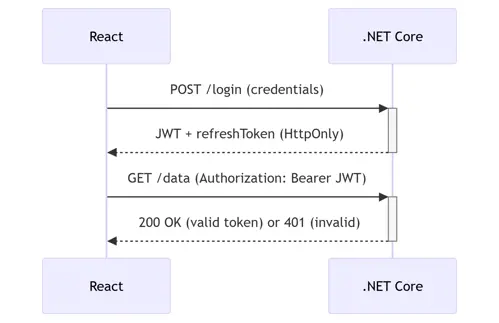
Unlike sticky server sessions, JWTs are self-contained passports. When implemented correctly:
React Frontend:
.NET Core Backend:
Are you looking to modernize your architecture? We recently helped a global marketplace client integrate ChatGPT to automate their core event management workflows, reducing administrative overhead by 40%. If you are interested in exploring how AI can solve similar scaling challenges for your business, we offer a complimentary Architectural Audit.
Critical Mistake #1: Using symmetric keys (HMACSHA256) for distributed systems.
Step 1: Asymmetric Key Generation (RSA 2048)
openssl genpkey -algorithm RSA -out private_key.pem -pkeyopt rsa_keygen_bits:2048
openssl rsa -pubout -in private_key.pem -out public_key.pem
Step 2: Configuration in Program.cs
var builder = WebApplication.CreateBuilder(args);

// Load keys from secure storage (Azure Key Vault/AWS Secrets Manager)
var privateKey = Environment.GetEnvironmentVariable("JWT_PRIVATE_KEY");
var publicKey = Environment.GetEnvironmentVariable("JWT_PUBLIC_KEY");

builder.Services.AddAuthentication(JwtBearerDefaults.AuthenticationScheme)
    .AddJwtBearer(options => {
        options.TokenValidationParameters = new TokenValidationParameters {
            ValidateIssuer = true,
            ValidateAudience = true,
            ValidateLifetime = true,
            ValidateIssuerSigningKey = true,
            ValidIssuer = "faciletechnolab.com",
            ValidAudience = "faciletechnolab.com",
            IssuerSigningKey = new RsaSecurityKey(
                RSA.Create().ImportFromPem(privateKey) // Asymmetric validation
        };
    });
Note: Symmetric keys are acceptable only for monolithic apps. For microservices, always use RSA.
Pitfall Alert: 92% of JWT leaks originate from frontend storage mistakes.
Secure Token Handling
// auth.service.js
import { jwtDecode } from 'jwt-decode';

export const login = async (email, password) => {
  const response = await fetch('/api/auth/login', {
    method: 'POST',
    headers: { 'Content-Type': 'application/json' },
    body: JSON.stringify({ email, password })
  });

  const { token, refreshToken } = await response.json();

  // Store refreshToken as HttpOnly cookie (secure against XSS)
  document.cookie = `refreshToken=${refreshToken}; HttpOnly; Secure; SameSite=Strict`;

  // Store JWT in memory (vanishes on tab close)
  return jwtDecode(token);
};

// ProtectedRoute.jsx
import { createContext, useContext, useEffect, useState } from 'react';

const AuthContext = createContext();

export const AuthProvider = ({ children }) => {
  const [user, setUser] = useState(null);

  useEffect(() => {
    const validateToken = async () => {
      try {
        // Silent refresh via HttpOnly cookie
        const res = await fetch('/api/auth/refresh', { credentials: 'include' });
        const { token } = await res.json();
        setUser(jwtDecode(token));
      } catch (err) {
        window.location.href = '/login';
      }
    };
    validateToken();
  }, []);

  return (
    <AuthContext.Provider value={{ user }}>
      {user ? children : <div>Loading...</div>}
    </AuthContext.Provider>
  );
};Practice 1: Token Expiry Strategy
Access Token: 5-15 minutes (limits exposure if leaked)
Refresh Token: 7 days (stored as HttpOnly cookie)
// .NET Core Token Service
public AuthResponse GenerateTokens(User user) {
    var accessToken = new JwtSecurityToken(
        issuer: _config["Jwt:Issuer"],
        audience: _config["Jwt:Audience"],
        claims: GetUserClaims(user),
        expires: DateTime.UtcNow.AddMinutes(10), // Short-lived
        signingCredentials: _signingCredentials
    );

    var refreshToken = new JwtSecurityToken(
        expires: DateTime.UtcNow.AddDays(7)
    );

    return new AuthResponse {
        AccessToken = new JwtSecurityTokenHandler().WriteToken(accessToken),
        RefreshToken = new JwtSecurityTokenHandler().WriteToken(refreshToken)
    };
}
Practice 2: Token Blacklisting for Logouts
Problem: JWTs are stateless – can’t be revoked until expiry.
Solution: Maintain minimal server-side state for blacklisted tokens.
// Redis blacklist in .NET Core
public async Task Logout(string token) {
    var expiry = _tokenHandler.ReadToken(token).ValidTo;
    await _redis.StringSetAsync($"blacklist:{token}", "revoked",
        expiry - DateTime.UtcNow);
}

// In JWT validation:
options.Events = new JwtBearerEvents {
    OnTokenValidated = async context => {
        var redis = context.HttpContext.RequestServices.GetService<IDatabase>();
        if (await redis.KeyExistsAsync($"blacklist:{context.SecurityToken}")) {
            context.Fail("Token revoked");
        }
    }
};Pitfall 1: Role Checks in Frontend Only
Exploit: Hackers bypass React to call APIs directly.
Fix: Always validate roles in .NET Core controllers.
[Authorize(Roles = "Admin")]
[HttpGet("sensitive-data")]
public IActionResult GetSensitiveData() { ... }
Pitfall 2: Storing Sensitive Data in JWT
Risk: Tokens decoded at jwt.io expose secrets.
Rule: Never store PII, passwords, or secrets in claims. Use opaque references:
// Bad
{ "email": "user@facile.com", "role": "Admin" }

// Good
{ "sub": "a7f8d0", "scope": "read:data write:data" }
Pitfall 3: Not Verifying Token Signatures
Nightmare Scenario: Malicious actor self-issues "admin" tokens.
Solution: Always validate on backend (automatic with .AddJwtBearer()).
Scenario 1: Microservices Auth
Strategy: Central auth service issues JWTs → services validate signatures independently.
// In ProductService Program.cs
services.AddAuthentication(JwtBearerDefaults.AuthenticationScheme)
    .AddJwtBearer(o => {
        o.Authority = "https://auth.facile.com";
        o.Audience = "product-service";
    });
Scenario 2: Permission Granularity
Problem: Role-based auth too coarse for complex apps.
Solution: Policy-based authorization with custom requirements.
// In Program.cs
services.AddAuthorization(o => {
    o.AddPolicy("Over18", p =>
        p.RequireClaim("Age", "18", "19", "20"));
});

// In Controller
[Authorize(Policy = "Over18")]
[HttpGet("alcohol-products")]
public IActionResult GetAlcoholProducts() { ... }
Starting a new .NET 10 project from scratch will require you to implement so many boilerplate features. You will end up wasting weeks of time.
Brick Starter Template for React can help you save weeks of time by providing the full boilerplate implementation with 13+ ready to use features at fraction of cost.
Brick .NET Starter TemplatesConclusion: Security Is a Process, Not a Feature. JWTs offer unparalleled flexibility for .NET Core and React architectures but demand rigorous discipline:
"The most secure JWT token is the one that never exists longer than necessary."
See our work on a developer mentoring platform that handles high concurrent user loads with a scalable .NET Core backend and responsive React frontend.



Subscribe to Facile Technolab's monthly newsletter to receive updates on our latest news, offers, promotions, resources, source code, jobs and other exciting updates.