How to design a multi-tenant SaaS architecture on Microsoft Azure. Tenancy models, data isolation, Azure SQL Elastic Pools, Entra ID, and infrastructure patterns.
How to design a multi-tenant SaaS architecture on Microsoft Azure. Tenancy models, data isolation, Azure SQL Elastic Pools, Entra ID, and infrastructure patterns.
Designing a multi-tenant SaaS platform on Microsoft Azure involves two distinct layers of decisions: the application architecture (how tenants are identified and how their data is separated in code) and the infrastructure architecture (which Azure services to use, how to size them, and how to keep costs under control as tenant count grows). This guide covers the infrastructure layer - the Azure-specific decisions that determine how your platform scales, what it costs to operate, and whether enterprise customers will trust it with their data.
For the ASP.NET Core implementation of the patterns described here like tenant resolution middleware, EF Core global query filters, per-tenant authentication, see our multi-tenant SaaS development guide with ASP.NET Core.
Every multi-tenant SaaS architecture is balancing the same tension: isolation costs money, sharing introduces risk. A fully isolated architecture - separate infrastructure per tenant - gives enterprise customers the guarantees they want but prices you out of the SMB market. A fully shared architecture keeps costs low but makes it harder to demonstrate compliance and creates "noisy neighbor" risk where one tenant's workload affects others.
The goal is a design that matches your isolation level to your customer profile and can evolve as that profile changes. Most SaaS products start shared and add isolation options as they acquire larger, more compliance-sensitive customers.
Your tenancy model is the foundation of your Azure SaaS architecture. There is no universally correct model - only the one that fits your current revenue profile, compliance requirements, and operational capacity.
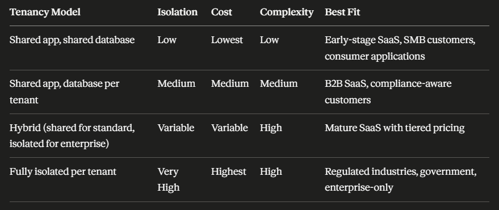
The hybrid model is where most successful B2B SaaS products end up.
Standard customers share infrastructure; enterprise or regulated customers (healthcare, financial services) pay a premium for an isolated environment. Design for the hybrid model from the start, even if you only implement the shared tier initially - retrofitting isolation options into a shared-only architecture is significantly harder than adding isolation to a platform designed to support both.
Azure App Service is the right starting point for most multi-tenant ASP.NET Core SaaS applications. A single App Service deployment serves all tenants - the tenant resolution middleware in the application differentiates requests. App Service handles automatic scaling, SSL termination, managed certificates, and deployment slots for zero-downtime releases.
Key configuration for multi-tenant App Service:
Azure Kubernetes Service (AKS) becomes relevant when the application needs to scale components independently - for example, a high-volume API layer that needs more replicas than the background processing layer. For most SaaS products serving under a few hundred tenants, App Service's managed scaling is sufficient and significantly simpler to operate.
Azure SQL Database (shared schema model)
For shared-schema multi-tenancy where all tenants share the same database with row-level filtering, a single Azure SQL Database in the General Purpose or Business Critical tier handles the workload. The important configuration choices:
Azure SQL Elastic Pools (database per tenant model)
For database-per-tenant isolation, Azure SQL Elastic Pools allow multiple tenant databases to share a pool of compute resources (eDTUs or vCores), providing the data isolation of individual databases without the cost of dedicated compute per tenant.
How Elastic Pools work: you provision a pool with a defined compute capacity, add tenant databases to the pool, and each database draws from the shared pool as needed. A tenant generating heavy load can burst above their average allocation, but the pool enforces maximum limits per database so one tenant cannot consume the entire pool's capacity.
Sizing guidance:
-- Create a new tenant database in the Elastic Pool
CREATE DATABASE tenant_acme
    ( SERVICE_OBJECTIVE = ELASTIC_POOL ( name = saas_pool ) );
Azure Cosmos DB for SaaS products with globally distributed tenants or document-oriented data models. Cosmos DB's partition key maps naturally to TenantId, providing physical data isolation per tenant within a shared account, with throughput that can be provisioned per partition. The trade-off is cost - Cosmos DB is more expensive than SQL Database for relational, transaction-heavy workloads.
Microsoft Entra ID (formerly Azure Active Directory) is the standard identity platform for B2B SaaS on Azure. The multi-tenant app registration model allows users from any Entra ID tenant to authenticate to your application using their existing organizational credentials.
Multi-tenant vs single-tenant app registration:
Multi-tenant registration (signInAudience: AzureADMultipleOrgs) - any organization's Entra ID users can sign in. Appropriate for SaaS products selling to multiple enterprise customers.
Single-tenant registration - only your own organization's users can sign in. Appropriate for internal applications, not public SaaS.
Key configuration for multi-tenant Entra ID:
"AzureAd": {
    "Instance": "https://login.microsoftonline.com/",
    "TenantId": "common",
    "ClientId": "your-app-registration-client-id",
    "ClientSecret": "managed via Key Vault, not appsettings",
    "CallbackPath": "/signin-oidc"
}
Claims mapping for tenant resolution: When a user authenticates through Entra ID, the JWT token includes the tid claim (tenant ID - the authenticating organization's Entra ID directory ID). Map this to your application's internal tenant identifier during the authentication flow.
Azure AD B2C for consumer-facing SaaS products where customers manage their own users independently of any corporate identity provider - supports local accounts, social logins (Google, Facebook), and custom identity providers in a single managed service.
Azure Cache for Redis is the standard distributed cache for multi-tenant ASP.NET Core applications on Azure.
In a multi-tenant context, Redis serves three distinct purposes:
Tenant settings cache: Loading tenant configuration (connection string, feature flags, branding) on every request adds unnecessary database overhead. Cache tenant settings in Redis with a short TTL (60–300 seconds) so the tenant middleware resolves context quickly without a database round-trip.
var tenantSettings = await _cache.GetOrSetAsync(
    $"tenant:settings:{tenantId}",
    async () => await _tenantRepo.GetSettingsAsync(tenantId),
    TimeSpan.FromMinutes(5));
Per-tenant response cache: Cache query results and page output scoped to the tenant. Every cache key must include the TenantId - a cache key without it will serve one tenant's data to another.
Distributed session state: For applications using server-side session, Redis provides session storage that works correctly across multiple App Service instances behind a load balancer.
Redis tier selection: The Basic tier (single node, no SLA) is appropriate for development and low-traffic staging. The Standard tier (replication, 99.9% SLA) is the minimum for production. The Premium tier adds persistence, geo-replication, and VNet integration - necessary for regulated environments where cache data is sensitive.
Azure Key Vault is the correct store for all secrets in a multi-tenant SaaS application: per-tenant database connection strings, API keys, SSL certificates, and any value that would cause a security incident if exposed.
Structure for multi-tenant secrets in Key Vault:
saas-keyvault/
├── secrets/
│   ├── tenant-acme-connectionstring
│   ├── tenant-globex-connectionstring
│   ├── stripe-api-key
│   └── sendgrid-api-key
└── certificates/
    └── wildcard-yoursaas-com
Azure App Configuration alongside Key Vault for non-secret per-tenant configuration - feature flags, UI settings, plan-based capability flags. App Configuration integrates with ASP.NET Core's IConfiguration system and supports dynamic refresh without application restart.
The connection between App Service and Key Vault should use Managed Identity - the App Service's identity is granted access to Key Vault directly, eliminating the need for any credential in application configuration.
// In Program.cs - no credentials required, Managed Identity handles auth
builder.Configuration.AddAzureKeyVault(
    new Uri("https://your-vault.vault.azure.net/"),
    new DefaultAzureCredential());
Azure Application Insights is the standard monitoring platform for ASP.NET Core SaaS on Azure. For multi-tenant applications, the critical configuration is adding TenantId as a custom dimension on every telemetry event - without this, production incidents cannot be attributed to specific tenants.
// Custom telemetry initializer - adds TenantId to every trace
public class TenantTelemetryInitializer : ITelemetryInitializer
{
    private readonly ITenantContext _tenantContext;

    public TenantTelemetryInitializer(ITenantContext tenantContext)
        => _tenantContext = tenantContext;

    public void Initialize(ITelemetry telemetry)
    {
        if (telemetry is ISupportProperties props)
        {
            props.Properties["TenantId"] = _tenantContext.TenantId;
        }
    }
}
Register in Program.cs:
builder.Services.AddSingleton<ITelemetryInitializer, TenantTelemetryInitializer>();
With TenantId on every telemetry event, you can:
Azure Monitor Alerts for proactive monitoring: configure alerts on App Service response time (p95 > 2 seconds), SQL database DTU consumption (> 80% sustained), Redis memory usage (> 70%), and failed dependency calls.
Manual tenant provisioning fails at scale. When a new customer signs up, every step - creating the tenant database, loading default configuration, provisioning Key Vault secrets, sending welcome email - should happen automatically without developer intervention.
Infrastructure as Code for tenant provisioning:
Use Azure Bicep or Terraform templates that accept a tenant identifier as a parameter and create all required resources:
param tenantId string
param elasticPoolName string

resource tenantDb 'Microsoft.Sql/servers/databases@2022-05-01-preview' = {
  name: 'tenant-${tenantId}'
  parent: sqlServer
  location: resourceGroup().location
  sku: { name: 'ElasticPool' }
  properties: {
    elasticPoolId: elasticPool.id
    maxSizeBytes: 10737418240 // 10 GB
  }
}
Automated provisioning workflow:
Multi-tenant SaaS cost management requires visibility at the tenant level - knowing which tenants are generating infrastructure cost is essential for profitability analysis and pricing decisions.
Resource tagging for tenant cost attribution:
Tag all tenant-specific Azure resources with TenantId and use Azure Cost Management to filter costs by tag. For shared resources (the App Service, shared Redis, Application Insights), use Application Insights custom dimensions and Azure Monitor to allocate costs proportionally by tenant usage.
Cost levers by architecture layer:
Which Azure database service is best for a multi-tenant SaaS?
For shared-schema multi-tenancy (all tenants in one database), a single Azure SQL Database in the General Purpose tier is the right starting point. For database-per-tenant isolation, Azure SQL Elastic Pools provide the best balance of tenant isolation and cost efficiency - individual databases with shared compute. Azure Cosmos DB is appropriate for globally distributed SaaS products or document-oriented data models, but costs more than SQL Database for relational workloads.
How do you handle wildcard SSL certificates for tenant subdomains on Azure?
Configure a wildcard custom domain (*.yoursaas.com) on your Azure App Service and provision a wildcard SSL certificate. Azure App Service Managed Certificates do not support wildcard domains - use Azure Key Vault with a certificate from a supported CA, or a third-party certificate (Let's Encrypt via cert-manager if using AKS). The wildcard DNS record (*.yoursaas.com → your App Service CNAME) is configured in your DNS provider, not in Azure.
How many tenants can an Azure SQL Elastic Pool support?
A pool's capacity depends on the eDTU or vCore tier and the per-database limits you set. A 100 eDTU pool with a 10 eDTU per-database maximum can technically contain up to 500 databases, though practical capacity depends on actual usage patterns. Most B2B SaaS applications with typical workloads can support 20–50 active databases per 100 eDTUs. Monitor per-database DTU consumption in Azure Monitor and scale the pool capacity (not the number of databases) when average pool utilization consistently exceeds 70%.
Should we use Azure App Service or AKS for a multi-tenant SaaS?
Start with Azure App Service. It handles scaling, SSL, deployment slots, and managed certificates with minimal operational overhead. Move to AKS when you need independent scaling of application components (an API layer that needs different scaling behaviour from a background processing layer), custom networking requirements, or the team has Kubernetes expertise. AKS is significantly more complex to operate than App Service and rarely justified until a SaaS product has reached meaningful scale.
How do we ensure one tenant's performance doesn't affect others?
Three primary mechanisms: (1) Per-database DTU limits in SQL Elastic Pools prevent a single tenant's database from consuming the entire pool. (2) Per-tenant rate limiting in the ASP.NET Core API layer prevents a single tenant from monopolizing application-layer resources. (3) Moving expensive operations (bulk exports, reports, data processing) to background jobs via Azure Service Bus decouples them from the interactive request path. Application Insights with TenantId dimensions lets you identify which tenant is generating load before it becomes a complaint.
What is the right Azure region strategy for a multi-tenant SaaS?
For most SaaS products serving a primary geographic market, a single Azure region is sufficient. Add a secondary region for disaster recovery using Azure SQL geo-replication and App Service Traffic Manager failover when uptime SLAs require it. For SaaS products with tenants in multiple regulated jurisdictions (EU data residency, Australian data sovereignty), a multi-region architecture with per-tenant data residency configuration becomes a compliance requirement rather than an optional feature.
A well-designed multi-tenant Azure infrastructure is the difference between a SaaS product that costs proportionally less to operate as it grows and one where infrastructure costs rise faster than revenue. The decisions described here - Elastic Pool sizing, Redis tier selection, Key Vault integration, tenant-aware monitoring - are the ones that affect operational economics at scale.
For the ASP.NET Core implementation that sits on top of this infrastructure - tenant resolution middleware, EF Core global query filters, per-tenant authentication patterns, and the code-level multi-tenancy implementation - see our companion guide on building multi-tenant SaaS with ASP.NET Core.
If you're designing a multi-tenant SaaS architecture and want an experienced team rather than working through these decisions alone, our SaaS development team has delivered multi-tenant platforms on Azure for clients across healthcare, fintech, and enterprise verticals.