Healthcare HealthTech HIPAA ASP.NET Core AI FHIRHow to Build HIPAA-Compliant ASP.NET Healthcare Apps in 2026
- Monday, November 17, 2025
- Thursday, March 19, 2026
Learn how to build secure, HIPAA-compliant healthcare apps using ASP.NET Core and Azure. Includes architecture, security controls, deployment steps, and 2026 best practices.
Key Takeaways
- Start with Security: Build security into your application from day one, not as an afterthought. Use ASP.NET Core's built-in security features and follow secure coding practices.
- Leverage Azure: Take advantage of Azure's HIPAA-compliant infrastructure, including Azure Health Data Services, Key Vault, and Security Center.
- Implement Defense in Depth: Use multiple layers of security—encryption, authentication, authorization, audit logging, and monitoring.
- Stay Current: HIPAA regulations and security threats evolve. Maintain your application with regular updates, security patches, and compliance assessments.
- Document Everything: Maintain comprehensive documentation of your security measures, risk assessments, and compliance efforts.
- Train Your Team: Ensure all developers, administrators, and users understand their HIPAA responsibilities.
- Plan for Incidents: Have a tested incident response plan ready for potential data breaches.
Introduction
Building secure, HIPAA-compliant healthcare web applications has never been more critical. With data breaches costing healthcare organizations an average of $10.93 million in 2023, and HIPAA regulatory fines reaching millions of dollars, developers must prioritize compliance from day one. ASP.NET Core provides a robust, enterprise-grade framework perfectly suited for healthcare applications that handle Protected Health Information (PHI).
This article walks you through building HIPAA-compliant web applications using ASP.NET Core and Azure, covering architecture, security best practices, and compliance requirements.
The healthcare industry trusts technology to protect its most sensitive asset, patient health information. In this article, we are going to discuss the HIPAA compliance measures in your ASP.NET applications so that you can contribute to safer, more secure healthcare technology that patients and providers can trust.
Whether you’re building a telemedicine platform, electronic health record system, patient portal, or healthcare analytics application, ASP.NET Core and Azure provide the tools and infrastructure needed to meet HIPAA requirements while delivering exceptional user experiences.
Remember: HIPAA compliance is not a destination but a continuous journey of improvement, vigilance, and commitment to protecting patient privacy in an increasingly digital healthcare landscape.
Understanding HIPAA Compliance Requirements for Web Applications
The Health Insurance Portability and Accountability Act (HIPAA) sets strict standards for protecting sensitive patient health information. Any healthcare application that stores, processes, or transmits electronic Protected Health Information (ePHI) must comply with HIPAA regulations.
Key HIPAA Compliance Components
- Privacy Rule: Governs how PHI can be used and disclosed.
- Security Rule: Establishes technical, physical, and administrative safeguards.
- Breach Notification Rule: Requires notification of data breaches.
- Enforcement Rule: Defines penalties for non-compliance.
For ASP.NET developers building healthcare applications in 2026, compliance isn't optional—it's mandatory. Violations can result in fines ranging from $100 to $50,000 per violation, with maximum annual penalties of $1.5 million per violation category.
Why Choose ASP.NET for Healthcare Applications?
ASP.NET Core has emerged as a leading framework for healthcare application development, offering enterprise-grade security, scalability, and performance. Here's why major healthcare organizations trust ASP.NET:
Security-First Architecture
ASP.NET Core includes built-in protection against common web vulnerabilities including SQL injection, cross-site scripting (XSS), and cross-site request forgery (CSRF). These security features align perfectly with HIPAA's technical safeguard requirements.
Microsoft Azure Integration
Seamless integration with Azure cloud services provides HIPAA-compliant infrastructure, including Azure Health Data Services, which offers FHIR (Fast Healthcare Interoperability Resources) API support for modern healthcare interoperability.
Enterprise Support and Stability
Backed by Microsoft, ASP.NET Core offers long-term support (LTS) releases, ensuring stability for mission-critical healthcare applications that require multi-year maintenance cycles.
Performance at Scale
Healthcare organizations serve thousands of patients daily. ASP.NET Core delivers exceptional performance, handling millions of requests per second, crucial for telemedicine platforms and electronic health record (EHR) systems.
Build HIPAA-Compliant Healthcare Applications with Confidence
The Complete 2026 HIPAA Compliance Checklist for CTOs, CIOs, and Engineering Leaders Building on Azure & ASP.NET
Download our comprehensive 2026 HIPAA Web App Compliance Checklist and get instant access to a clear, actionable roadmap covering 34 critical compliance checkpoints with specific Azure and ASP.NET implementation guidance, authoritative resource links, and real-world healthcare examples.
Download Free Checklist Now →Essential Architecture for HIPAA-Compliant ASP.NET Applications
Building a compliant healthcare application requires careful architectural planning. Here's the recommended architecture for HIPAA-compliant ASP.NET web apps:
1. Multi-Tier Architecture
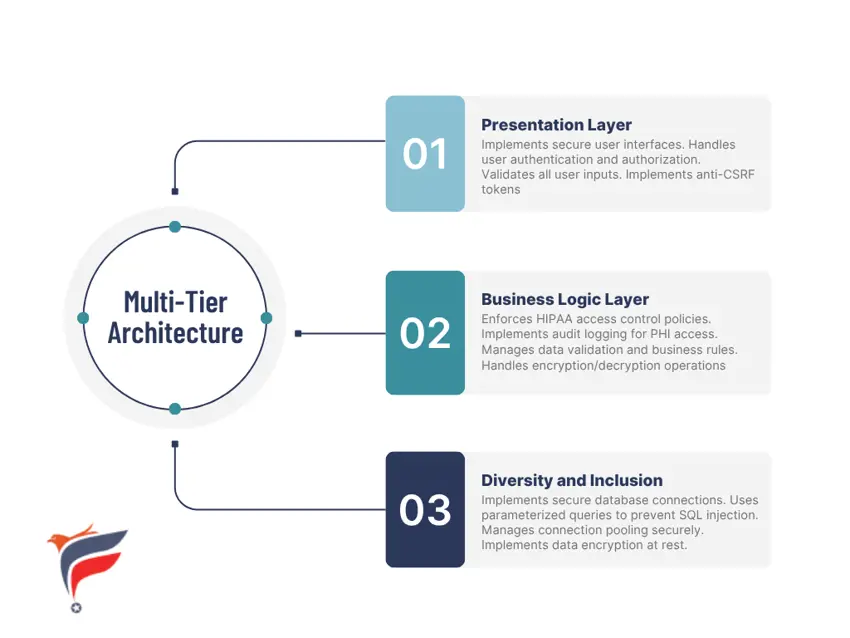
Implementing a secure multi-tier architecture is fundamental to building HIPAA-compliant healthcare applications in ASP.NET Core, as it provides clear separation of concerns that enhances both security and maintainability.
The presentation layer (UI/front-end) should be built using ASP.NET Core MVC or Razor Pages with strict Content Security Policy (CSP) headers, anti-XSS protections through automatic HTML encoding, and anti-CSRF tokens on all forms handling PHI—ensuring that user interfaces never directly access databases or contain sensitive business logic that could be exposed through client-side code.
The business logic layer (application/service layer) encapsulates all PHI processing rules, implements role-based access control (RBAC) through policy-based authorization, enforces minimum necessary data access principles, validates all inputs against healthcare-specific formats (NPI numbers, ICD-10 codes, FHIR resources), and maintains comprehensive audit logging of all PHI operations using structured logging frameworks like Serilog integrated with Azure Application Insights.
The data access layer (repository/ORM layer) utilizes Entity Framework Core with parameterized queries to prevent SQL injection, implements Azure SQL Database Transparent Data Encryption (TDE) for PHI at rest, enforces connection string security through Azure Key Vault integration, and applies column-level encryption using Always Encrypted for highly sensitive fields like Social Security numbers—with all database connections authenticated via managed identities rather than connection strings stored in configuration files.
This architectural separation ensures that security controls can be consistently enforced at each tier, PHI exposure is minimized through proper abstraction, code reviews can focus on layer-specific security concerns, and compliance auditors can easily trace data flow from user request through business logic to encrypted storage, demonstrating adherence to HIPAA's Technical Safeguards requirements for access controls, data integrity, and audit trails.
2. Security Components
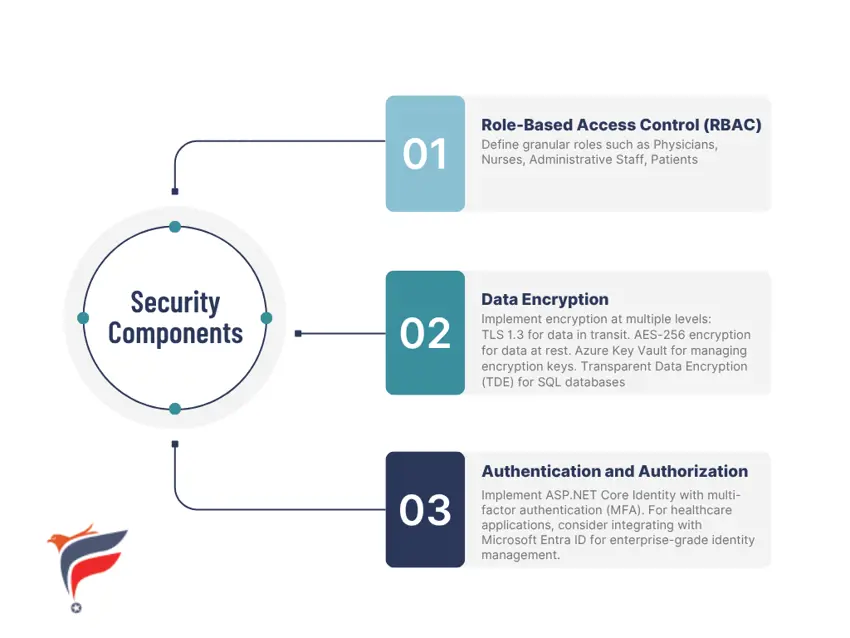
Core security components for HIPAA-compliant ASP.NET healthcare applications include implementing role-based access control (RBAC) through ASP.NET Core Identity with policy-based authorization restricting PHI access by job function, enforcing multi-factor authentication (MFA) via Microsoft Identity Platform with OAuth 2.0/OpenID Connect for secure user verification, and maintaining end-to-end encryption using TLS 1.2+ for data in transit and Azure SQL TDE for data at rest.
Implementing HIPAA Security Controls in ASP.NET
1. Access Control Implementation
- Configure strong password policies (minimum 12 characters, complexity requirements)
- Implement automatic session timeout (15 minutes of inactivity)
- Enable account lockout after failed login attempts
- Maintain user activity logs
2. Audit Controls
- Serilog or NLog for structured logging
- Azure Application Insights for centralized log management
- Log all create, read, update, delete (CRUD) operations on PHI
- Record user ID, timestamp, action type, and affected records
3. Integrity Controls
- Implement digital signatures for critical documents
- Use checksums to verify data integrity
- Enable database change tracking
- Implement version control for patient records
4. Transmission Security
- Enforce HTTPS with TLS 1.3
- Implement certificate pinning
- Use VPN for administrative access
- Enable Azure Front Door for DDoS protection
Deploying HIPAA-Compliant Applications on Azure
Azure Infrastructure Requirements
Microsoft Azure offers HIPAA-compliant cloud infrastructure with Business Associate Agreement (BAA) coverage. Here's how to properly deploy your ASP.NET healthcare application:
1. Azure App Service Configuration
- Deploy to Azure App Service with isolated service plan
- Enable Always On to prevent cold starts
- Configure custom domain with SSL certificate
- Enable Application Insights for monitoring
- Set up deployment slots for zero-downtime updates
2. Database Security
Azure SQL Database Configuration:
- Enable Transparent Data Encryption (TDE)
- Configure firewall rules (whitelist only necessary IPs)
- Enable Advanced Threat Protection
- Implement Always Encrypted for sensitive columns
- Set up automated backups with geo-redundancy
- Configure long-term retention policies
3. Azure Key Vault Integration
Store all sensitive configuration:
- Database connection strings
- API keys and secrets
- Encryption certificates
- Third-party service credentials
Access Key Vault using Managed Identity to avoid storing credentials in code.
4. Network Security
- Implement Azure Virtual Network (VNet) integration
- Use Azure Private Link for database connections
- Configure Network Security Groups (NSGs)
- Enable DDoS Protection Standard
- Implement Azure Application Gateway with Web Application Firewall (WAF)
Best Practices for Healthcare Application Development
1. Secure Coding Practices
Input Validation
- Validate all user inputs on both client and server sides
- Use ASP.NET Core's built-in ModelState validation
- Implement custom validation attributes for healthcare-specific rules
- Sanitize inputs to prevent XSS attacks
Parameter Binding Protection
- Use Data Transfer Objects (DTOs) instead of binding directly to entities
- Implement the [Bind] attribute to whitelist allowed properties
- Never trust client-side validation alone
SQL Injection Prevention
- Always use Entity Framework Core's parameterized queries
- Avoid raw SQL queries when possible
- If raw SQL is necessary, use SqlParameter objects
2. PHI Data Handling
Minimum Necessary Rule
Only access and display the minimum PHI required
- Implement field-level encryption for highly sensitive data
- Use data masking for displaying partial information
- Create separate views with limited data exposure
Data Retention and Disposal
- Implement automated data retention policies
- Securely delete PHI when no longer needed
- Maintain audit logs of data deletion
- Use Azure Blob Storage lifecycle management
3. Session Management
- Implement sliding session expiration (15 minutes recommended)
- Use secure, HttpOnly, SameSite cookies
- Regenerate session IDs after authentication
- Implement concurrent session detection
4. Error Handling and Logging
- Never expose PHI in error messages
- Log errors without including sensitive data
- Implement custom error pages
- Use structured logging with proper log levels
- Store logs in Azure Log Analytics with retention policies
Real-World Implementation Example: Patient Portal
Let’s walk through a practical example of building a HIPAA-compliant patient portal using ASP.NET Core:
Core Features
- Secure patient login with MFA
- View medical records and test results
- Schedule appointments
- Secure messaging with providers
- Prescription refill requests
- Billing and payment processing
Technology Stack
- ASP.NET Core 8.0 (LTS)
- Entity Framework Core
- Azure SQL Database
- Azure Key Vault
- Azure Application Insights
- SignalR for real-time notifications
Security Implementation Steps
1. Authentication Setup
Implement ASP.NET Core Identity with Azure AD B2C:
- Implement ASP.NET Core Identity with Azure AD B2C
- Configure MFA with SMS or authenticator apps
- Implement password complexity requirements
- Set session timeout to 15 minutes
- Enable account lockout after 5 failed attempts
2. Authorization Matrix
Define clear role-based permissions:
- Patients: View own records only
- Providers: View assigned patients
- Administrative staff: Limited access to scheduling/billing
- System administrators: Full access with audit logging
3. Data Encryption
- All PHI fields encrypted at the column level
- Use Always Encrypted for sensitive data like SSN
- Encryption keys stored in Azure Key Vault
- Rotate encryption keys annually
4. Audit Logging
Log every action involving PHI:
- User ID and session ID
- Timestamp with timezone
- Action performed (read, update, delete)
- IP address and user agent
- Patient record accessed
5. Secure Communication
- Implement end-to-end encryption for provider messaging
- Use SignalR over HTTPS for real-time updates
- Sanitize all user inputs to prevent XSS
- Implement rate limiting to prevent abuse
Testing and Compliance Validation
Security Testing
1. Penetration Testing
- Engage third-party security firms annually
- Test for OWASP Top 10 vulnerabilities
- Simulate real-world attack scenarios
- Document findings and remediation plans
2. Vulnerability Scanning
- Implement automated security scanning in CI/CD pipeline
- Use tools like OWASP ZAP, Burp Suite, or Netsparker
- Scan dependencies for known vulnerabilities
- Address critical vulnerabilities within 30 days
3. Code Reviews
- Implement mandatory peer code reviews
- Use static code analysis tools (SonarQube, Veracode)
- Focus on security-critical sections
- Document security decisions
Compliance Auditing
1. HIPAA Security Risk Assessment
Conduct annual risk assessments:
- Identify all PHI storage locations
- Evaluate potential threats and vulnerabilities
- Document security measures
- Create mitigation plans for identified risks
2. Audit Log Reviews
Regularly review audit logs:
- Monitor for unauthorized access attempts
- Identify unusual access patterns
- Review PHI access by users
- Maintain log review documentation
3. Business Associate Agreements
Ensure all vendors handling PHI have signed BAAs:
- Cloud service providers (Microsoft Azure)
- Third-party API integrations
- Email service providers
- Backup and disaster recovery services
Common HIPAA Compliance Challenges and Solutions
Challenge 1: Legacy System Integration
Many healthcare organizations still use legacy systems that weren't designed with modern security standards.
Solution:
- Implement API gateways to isolate legacy systems
- Use Azure API Management for secure integration
- Apply additional encryption layers for legacy data
- Plan phased migration to modern systems
Challenge 2: Third-Party Integrations
Integrating with EHR systems, lab systems, and billing platforms introduces compliance complexity.
Solution:
- Verify all third-party vendors have HIPAA BAAs
- Implement API security with OAuth 2.0
- Use Azure Health Data Services for FHIR interoperability
- Conduct security audits of all integrations
- Implement rate limiting and monitoring
Challenge 3: Mobile Access
Healthcare providers need mobile access to patient data, increasing security risks.
Solution:
- Implement mobile device management (MDM)
- Use certificate-based authentication
- Enable remote wipe capabilities
- Implement geo-fencing for sensitive operations
- Use Azure AD Conditional Access policies
Challenge 4: User Training and Compliance Culture
Technical controls are ineffective without proper user training.
Solution:
- Conduct regular HIPAA training for all users
- Implement simulated phishing tests
- Create clear security policies and procedures
- Establish incident response protocols
- Foster a culture of security awareness
Future Trends: Healthcare Technology in 2026 and Beyond
Healthcare technology continues to evolve rapidly, with innovations such as AI, telehealth, interoperability, and blockchain transforming patient care. ASP.NET plays a critical role in enabling secure, scalable, and HIPAA-compliant healthcare solutions that support these advancements.
AI and Machine Learning Integration
Healthcare applications increasingly incorporate AI for enhanced diagnostics, automation, and analytics:
- Clinical decision support systems
- Predictive analytics for patient outcomes
- Automated medical coding and billing
- Medical imaging analysis
When implementing AI in HIPAA-compliant applications:
- Ensure AI models don't inadvertently expose PHI
- Implement de-identification before training models
- Document AI decision-making processes
- Maintain human oversight for critical decisions
Telehealth and Remote Patient Monitoring
The COVID-19 pandemic accelerated telehealth adoption. ASP.NET applications must support:
- Real-time video consultations with end-to-end encryption
- Remote vital sign monitoring with IoT integration
- Asynchronous secure messaging
- Digital prescription management
Blockchain for Health Records
Blockchain is becoming an emerging solution for healthcare data security:
- Immutable audit trails
- Patient-controlled health data
- Enhanced interoperability
- Reduced breach risks
FHIR and Interoperability
FHIR is rapidly becoming the standard protocol for healthcare data exchange:
- Native support through Azure Health Data Services
- Enables seamless cross-system data sharing
- Supports patient access APIs
- Improves care coordination
Cost Considerations for HIPAA-Compliant Applications
Building secure healthcare applications involves several cost components:
Development Costs
- Development costs: $150,000–$500,000
- Security consulting: $10,000–$50,000
- Security audits: $15,000–$40,000 annually
- Penetration testing: $5,000–$25,000 per assessment
Infrastructure Costs (Azure)
- Azure App Service: $200–$1,000/month
- Azure SQL Database with TDE: $300–$2,000/month
- Key Vault: $50–$200/month
- Application Insights: $100–$500/month
- Azure Security Center: $15-$30 per server/month
Compliance & Operational Costs
- Compliance officer: $50,000–$150,000/year
- Annual risk assessments: $10,000–$30,000
- Employee training: $5,000–$20,000/year
- Incident response insurance: $2,000–$10,000/year
ROI Considerations
While HIPAA compliance requires significant investment, non-compliance costs far exceed compliance costs:
- Average healthcare breach cost: $10.93M
- HIPAA violation fines: $100–$50,000/violation
- Lawsuit legal fees: $500,000–$5M
Conclusion: Building Trust Through Compliance
Building HIPAA-compliant applications requires a blend of modern technology, strong security engineering, and continuous compliance management. ASP.NET provides the stability, performance, and security required to support the next generation of healthcare innovations.
Frequently Asked Questions
ASP.NET Core offers built-in protection against vulnerabilities like SQL injection, XSS, and CSRF, ensuring compliance with HIPAA's technical safeguard requirements. Its integration with Microsoft Azure also provides secure, compliant cloud infrastructure.
AI enables advanced capabilities such as predictive analytics, medical imaging analysis, automated billing, and decision support systems. When implemented securely, AI can dramatically enhance patient outcomes while maintaining HIPAA compliance.
Telehealth offers encrypted video consultations, remote patient monitoring, and secure messaging—features that support hybrid care models and improve patient accessibility. Healthcare providers increasingly rely on ASP.NET to build secure telehealth platforms.
FHIR enables seamless data exchange between healthcare systems, supports patient access APIs, and enhances care coordination. Azure Health Data Services provides native FHIR support, making ASP.NET-based platforms more interoperable.
Yes. Blockchain provides immutable audit trails, patient-controlled data, and secure data-sharing mechanisms. These features reduce breach risks and increase trust among healthcare stakeholders.
Costs typically include development, security audits, penetration testing, Azure infrastructure, compliance resources, and ongoing training. Although the initial investment is significant, non-compliance costs are much higher.